Can Proxmox Backup Server Back Up Physical Windows PCs?
No. As of October 2026, Proxmox Backup Server cannot back up a physical Windows machine directly, because its documentation describes only a Linux client and lists clients for other operating systems as a planned feature. The practical options are Veeam Agent for Windows Free or Windows Server Backup writing to a share on nearby storage, a Linux host for file copies, or converting the machine to a virtual machine.
Updated · Mr.PlanB
Overview
If you protect virtual machines with Proxmox Backup Server (PBS), physical Windows machines are the gap in the plan. The server itself is covered in the Proxmox Backup Server guide, and the wider product comparison is in best backup software for Windows.
What PBS supports today
The PBS introduction describes the product as a client-server backup solution that can back up virtual machines, containers and physical hosts. For physical hosts, the client is the command line tool proxmox-backup-client, which the introduction describes as usable "from any Linux amd64 environment." The client can back up a directory as a .pxar file archive or a block device as an .img image.
The installation documentation lists a client-only repository for APT-based systems and a statically linked build for generic x86-64 Linux. Windows appears there only in the steps for making installer media. The documentation for version 4.2, the current release line (it shipped on 29 April 2026), has no Windows client or agent.
The Proxmox roadmap confirms it. It lists "Backup clients for other operating systems" under features that are not yet released, and the 4.0, 4.1 and 4.2 release notes mention no Windows client. Check the roadmap again before you plan around a new release.
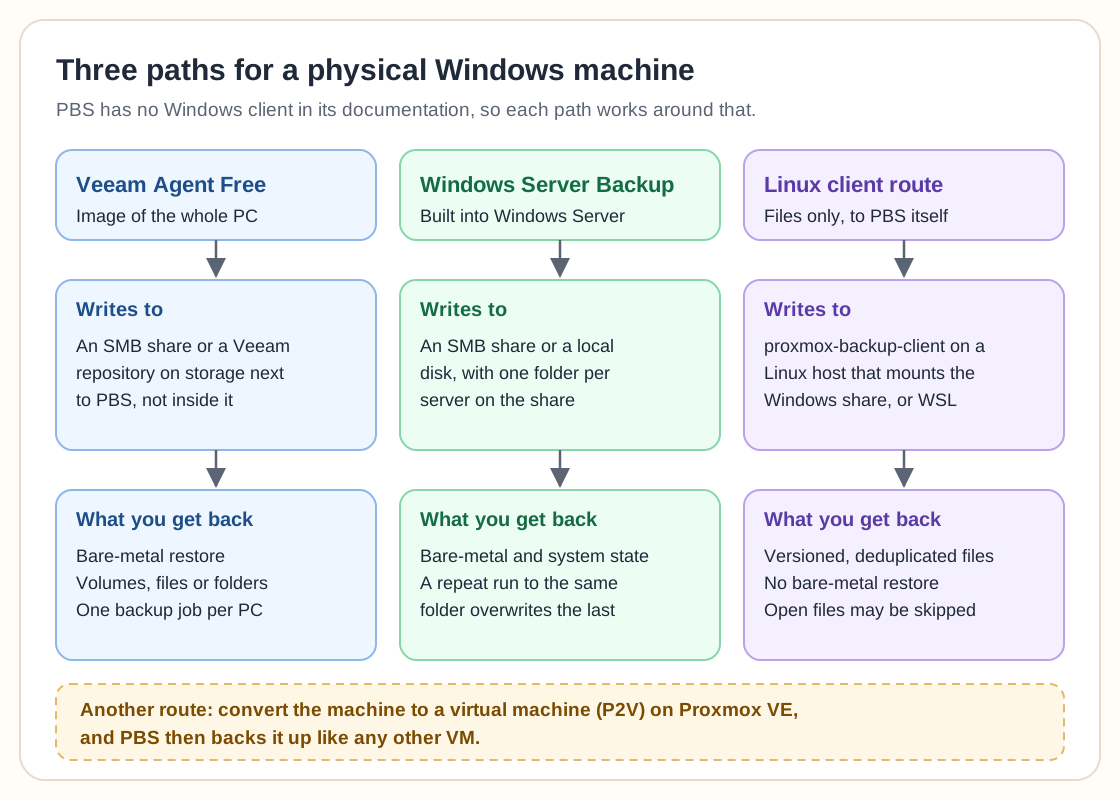
Option 1: Veeam Agent for Windows Free to a share beside PBS
Veeam's page says the free agent covers Windows desktops, laptops and tablets, backs up the whole PC, volumes or individual files and folders, and offers bare-metal restore. Its user guide says the Free edition allows one backup job, targeted at a local drive, a network shared folder or a Veeam backup repository. It does not include direct backup to object storage or to Veeam Cloud Connect.
This is the best fit for a physical Windows PC. Put a share on the same storage platform that holds your PBS data, for example a separate ZFS dataset or volume exported over SMB, and point the job at it. Keep that share apart from the PBS datastore directory, which PBS manages itself. The backups then share hardware with PBS without sharing its data, and you need a second copy of that share elsewhere.
For a Windows server, Veeam's page points to Veeam Backup & Replication Community Edition instead of the free agent. Check its limits on Veeam's site first.
Option 2: Windows Server Backup to an SMB share
Windows Server Backup is a feature you add to Windows Server, and wbadmin is its command line. For a bare-metal backup, Microsoft documents wbadmin start backup -allCritical -backupTarget: followed by the destination. A system state backup is wbadmin start systemstatebackup, which Microsoft says includes the registry and SYSVOL, and the Active Directory database on domain controllers. Microsoft's forest recovery guide offers both a local drive and a remote shared folder as destinations.
The limit to plan around is the overwrite behaviour. Microsoft's wbadmin page says a second backup of the same computer to the same remote shared folder overwrites the first, and that a failed run can leave you with no usable backup. Its advice is to create subfolders in the share, which needs twice the space. Give each server its own folder, rotate folders if you need history, and copy the share elsewhere. The Windows Server bare-metal backup guide covers the recovery step.
Option 3: Linux host and community clients
The workaround in older advice is to share a folder from the Windows machine, mount it on a Linux host, and run proxmox-backup-client there. The backups go into a PBS datastore with deduplication and versioning. It protects files only. The PBS documentation does not describe this Windows scenario, and a mounted share gives you no system image, so open files may not be read and Windows permissions may not carry over. Running the Linux client inside Windows Subsystem for Linux has the same limits. Test a restore before you trust either.
Two community projects aim at the gap, and neither comes from Proxmox. PBS Plus is an open source (MIT) add-on that installs on the PBS host and deploys a Windows agent. Its server mounts the agent's files through FUSE and runs proxmox-backup-client against the mount. Its latest release, 1.4.1, is from September 2026, and its documentation does not describe Windows limits such as permission handling. The proxmoxbackupclient_go project is a Windows and Linux client under GPL-3.0 that uses Volume Shadow Copy. Its README calls it alpha quality, says encryption support is missing, and says it is not affiliated with Proxmox. Treat both as lab material until you have restored real data from them.
Option 4: Convert the machine to a virtual machine
A physical-to-virtual (P2V) conversion turns the machine into a VM on Proxmox VE, and PBS then protects it in the usual way. Plan for drivers, because Windows does not include the VirtIO drivers for faster disk and network devices. Install the QEMU guest agent too, which Proxmox describes as using VSS on Windows to freeze the file system during backups. Run a test conversion before the real one.
Choosing between them
A Windows PC or laptop: Veeam Agent Free to an SMB share next to PBS.
A physical Windows Server: Windows Server Backup to its own folder on a share, or the Veeam Community Edition that Veeam suggests for servers.
Only some files, with PBS history wanted: a Linux host running the client, or a lab test of PBS Plus.
A server you want to retire as hardware: convert it to a VM.
Whatever you choose, keep one copy outside the building, as the 3-2-1-1-0 rule explains. What to look for in a physical server backup solution lists the questions to ask when you buy. In the Open-Source Backup Ledger, Proxmox Backup Server scores 66.2 out of 100.
Frequently asked questions
Does Proxmox Backup Server have a Windows client?
No. As of October 2026 the PBS documentation covers only a Linux client, and the roadmap lists clients for other operating systems as a future item. Community projects such as PBS Plus exist, and they are not Proxmox products.
Can I back up Windows files with WSL?
Yes, in a limited way. The Linux client can run inside WSL and copy selected files into PBS. It does not give you a system image or bare-metal restore, and open files may be skipped.
What is the simplest way to back up a physical Windows PC in a Proxmox environment?
Install Veeam Agent for Windows Free and point its single job at an SMB share on your storage, kept separate from the PBS datastore. You get image backup and bare-metal restore, and PBS stays dedicated to your virtual machines.
When should I use a dedicated Windows backup product?
When you need full-system images, bare-metal restore, application-aware protection and central management for several physical servers. The free tools above cover one machine well and get awkward beyond that.
Related guides
More from the backup hub on the same topics.
Need help with backup and recovery?
Use the form below to get in touch about backup strategy, recovery planning, and data protection projects.