OpenShift Backup, OpenShift Migration, and OpenShift DR
OpenShift backup protects cluster state, application resources, and persistent data so workloads can be restored after a failure. OpenShift migration uses the same recovery mechanisms to move workloads between clusters or platforms. OpenShift DR adds tested failover, replication, and recovery workflows that keep downtime and data loss within business targets.
Updated · Mr.PlanB
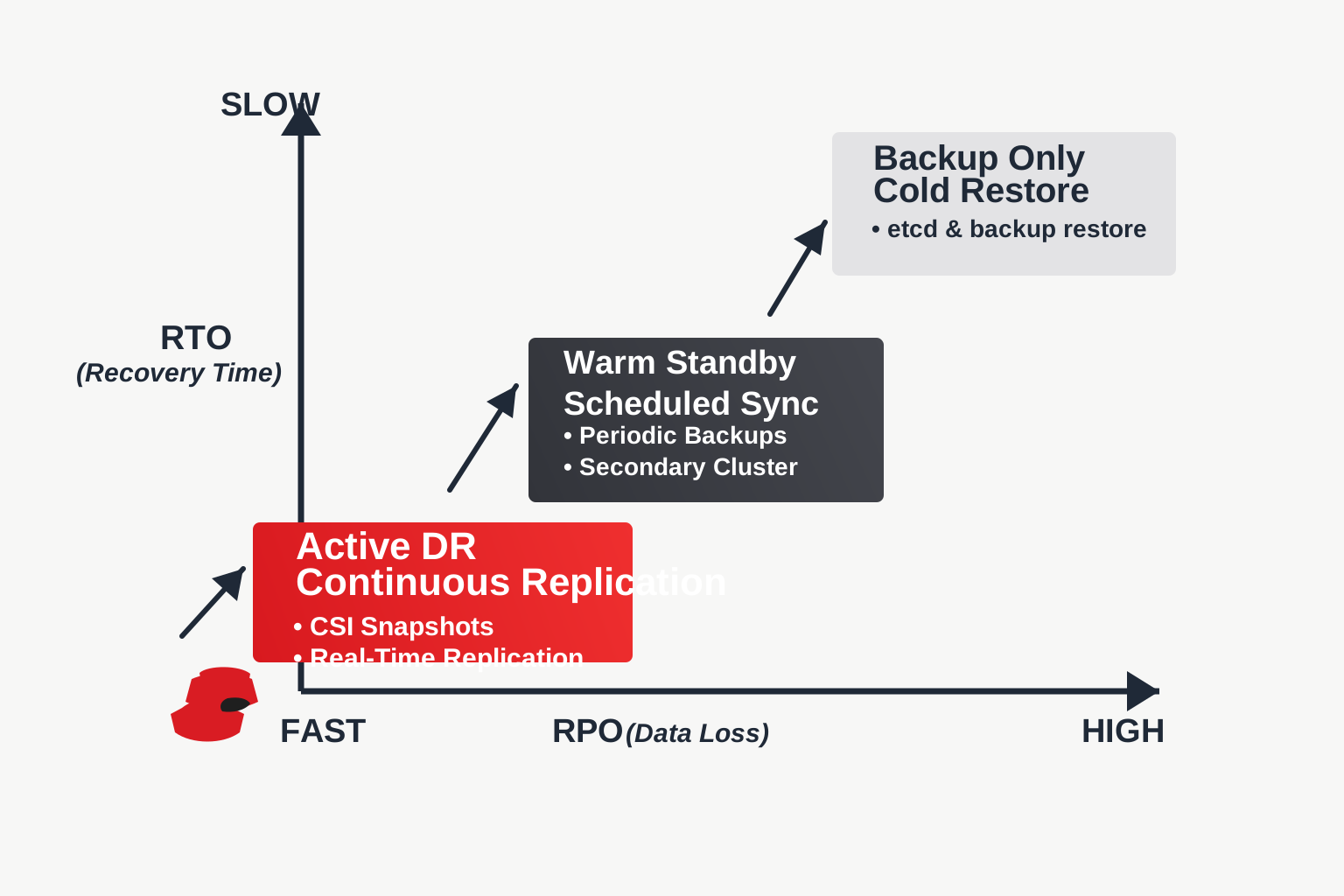
Structured overview
OpenShift environments usually fail in ways that hit infrastructure, storage, and application configuration at the same time, so a plain storage copy is not enough to recover them.
A complete protection plan should cover:
etcd and cluster-state recovery
Kubernetes objects such as namespaces, deployments, secrets, and config maps
Persistent volumes and storage snapshots
Application dependencies, operators, and policy configuration
Cross-cluster recovery paths for migration and disaster recovery
When these layers are protected together, teams can recover production workloads faster and move applications between OpenShift environments without rebuilding them by hand.
Comparison snapshot
| Criteria | Backup Only | Backup and Migration | Backup, Migration, and DR |
|---|---|---|---|
| Primary goal | Restore lost data | Move workloads safely | Restore service continuity |
| Cluster portability | Limited | High | High |
| Recovery speed | Moderate | Moderate | Fastest with planning |
| Persistent volume protection | Yes | Yes | Yes with coordinated failover |
| Testing requirement | Restore testing | Restore and cutover testing | Restore, failover, and runbook testing |
| Business continuity coverage | Partial | Partial | Strongest |
What OpenShift backup should include
Control plane protection
Take etcd snapshots and store them outside the failure domain of the production cluster.
Application-aware backup
Capture Kubernetes objects, policies, metadata, and persistent storage together so applications can be rebuilt consistently.
Storage-aware recovery
Where possible, use CSI snapshots or storage-integrated protection to speed up recovery of stateful workloads.
External retention
Keep backup data in durable external storage so a cluster-level outage cannot destroy the recovery copy.
When OpenShift migration becomes necessary
OpenShift migration usually follows a platform change, a consolidation, or a cloud relocation. Common triggers include:
Moving between on-premises and cloud OpenShift clusters
Replatforming during data center exit projects
Refreshing hardware or storage backends
Separating environments after mergers, compliance changes, or tenancy redesign
Copying YAML files is only part of an OpenShift migration. Teams also need compatible storage, network policies, a plan for the DNS cutover, and application-level validation in the destination cluster.
Building an OpenShift DR strategy
OpenShift DR is about keeping services recoverable under real operational pressure. The main questions are the recovery time objective, the recovery point objective, and how much infrastructure is already waiting on the other side.
Cold recovery
Restore into a rebuilt or replacement cluster. This costs less but is usually slower.
Warm standby
Keep a secondary environment that synchronizes periodically. Downtime is shorter, while cost and complexity stay manageable.
Active disaster recovery
Use continuous or near-continuous replication with well-rehearsed failover procedures. This suits the most critical applications.
Best practices for OpenShift backup, migration, and DR
Define RTO and RPO before choosing tools or architecture
Protect cluster state and application state separately but test them together
Run restore drills into alternate namespaces or clusters
Validate persistent volume recovery for stateful applications
Automate policies instead of relying on manual backup jobs
Document migration cutover and DR failover runbooks
Keep backup copies off-cluster and outside the primary failure domain
With these practices in place, OpenShift backup becomes a recovery system you can use in an incident, rather than something kept for compliance.
Common mistakes
Backing up only etcd
An etcd backup helps rebuild cluster state, but it does not fully recover application data and runtime dependencies.
Treating migration like a basic restore
Migration requires compatibility checks, validation, and cutover planning.
Skipping failover tests
OpenShift DR plans that were never tested often fail when networking, storage, or operator dependencies come under stress.
Ignoring application ownership
Platform teams and app teams both need clear responsibilities for recovery validation.
Frequently asked questions
What is the difference between OpenShift backup and OpenShift DR?
OpenShift backup keeps recoverable copies of data and configuration. OpenShift DR adds tested operational processes and standby strategies so service can be restored quickly after a disruption.
Can OpenShift backup be used for OpenShift migration?
Yes. The same application-aware backups used for recovery can support migration, although teams still need compatibility checks, testing, and cutover planning.
Does OpenShift migration require downtime?
Not always. Downtime depends on the application, the storage method, the replication model, and how much pre-staging has been done.
What should be included in an OpenShift DR plan?
Recovery targets, backup scope, replication design, restore procedures, failover steps, validation criteria, and ownership across platform and application teams.
Why is persistent volume protection so important in OpenShift backup?
Databases, queues, and other stateful services need consistent data recovery, and stateless manifests alone cannot provide it.
Related guides
More from the backup hub on the same topics.
Need help with backup and recovery?
Use the form below to get in touch about backup strategy, recovery planning, and data protection projects.