Windows Backup Strategy for Servers and Workstations
A Windows backup strategy sets a recovery point, a recovery time and a separate copy for each type of machine. PCs get a nightly image and an offsite copy, workstations add hourly file versions, and Windows servers get bare-metal backups, with system state for domain controllers. Every type needs an immutable offsite copy and regular restore tests.
Updated · Mr.PlanB
Overview
A laptop, a design workstation and a domain controller fail in different ways and lose different things, so one policy stretched over all of them leaves gaps. This page sets out a plan by machine type. The products that implement it are compared in best backup software for Windows, and the free tools for a single PC are in the best free Windows backup program guide.
Two numbers per machine: RPO and RTO
Recovery point objective (RPO) is how much recent work you can afford to lose. If the backup runs nightly, you can lose up to a day. Recovery time objective (RTO) is how long the machine can stay down before the damage becomes serious. A faster RTO needs a recent image, a tested restore path and a destination that is close by.
Ask the owner of each machine how much work they could redo and how long they could wait. The answers pick the schedule and the storage. The targets below are typical planning starting points, not vendor guarantees, so replace them with figures your business accepts.
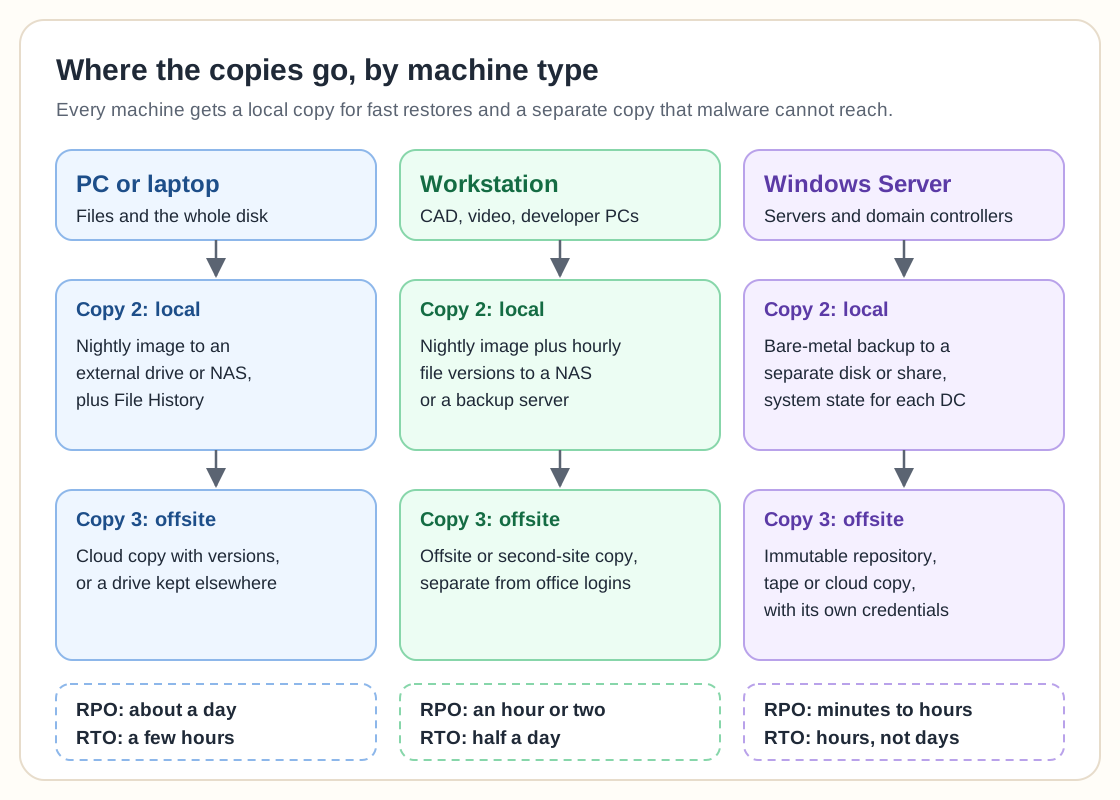
Strategy by machine type
PCs and laptops
A PC needs two kinds of protection. File backup keeps documents and earlier versions, and an image brings back the whole machine after a disk failure. A nightly image to an external drive or a NAS, plus Windows File History for documents, covers a single user. The RPO is about a day and the RTO is a few hours, mostly spent booting rescue media and waiting for the restore.
Laptops leave the office, so a cloud copy with versions suits roaming staff better than a drive at their desk. For setups with an external drive, see the free backup programs guide.
Workstations
Design, video, engineering and developer machines hold work that changes all day and takes hours to recreate. Keep the nightly image and add hourly file versions to a NAS or a backup server. The RPO drops to an hour or two. An image keeps the long list of installed tools, which is the main reason to image a workstation rather than reinstall it.
Windows Server
Servers carry shared files, databases and line-of-business applications, so downtime costs more. Windows Server Backup is not installed by default, and Microsoft documents it for both the console and the wbadmin command line.
For bare-metal recovery, Microsoft documents wbadmin start backup -allCritical -backupTarget: followed by a drive letter. The -allCritical option includes all critical volumes, meaning the volumes that hold the operating system state, and Microsoft notes the target volume cannot be one of the volumes in the backup. To restore the whole system you boot into the Windows Recovery Environment and use wbadmin start sysrecovery, which Microsoft says is only available there. The Windows Server bare-metal backup guide walks through the recovery.
Be careful with remote shares. Microsoft's wbadmin page says that backing up to the same remote shared folder again overwrites the previous backup, and that a failed run can leave you without a usable backup. Its advice is to create subfolders in the share, which needs twice the space. A dedicated local disk or a backup server with proper retention is a safer destination for production servers.
Domain controllers
A domain controller needs a system state backup in addition to, or inside, the full-server backup. Microsoft's wbadmin page says system state includes the registry, SYSVOL, and the Active Directory database NTDS.DIT on domain controllers, and that user registry hives are not part of it. The command is wbadmin start systemstatebackup -backupTarget: with a drive letter.
Microsoft's Active Directory forest recovery guide recommends a bare-metal backup, because it can be restored to different hardware or a different operating system instance. Keep backups of at least one domain controller per domain, and treat them as sensitive, since they hold password data. Microsoft's Azure Backup guidance for Active Directory adds two points. A backup older than the tombstone lifetime should not be used, and the default tombstone lifetime for domains built on Windows Server 2003 SP2 and later is 180 days. If another healthy domain controller exists, building a new server and promoting it is simpler than restoring a failed one. Microsoft expects a documented, tested recovery plan, reviewed routinely, for example every year.
Retention suggestions
Retention is where plans go wrong, because the target fills and jobs begin to fail. These are starting points to adjust to your storage and your data retention rules.
| Machine type | Keep | Why |
|---|---|---|
| PC or laptop | 14 to 30 daily images, 6 to 12 monthly file versions | Covers a late-noticed mistake |
| Workstation | 30 daily images, 12 weekly, hourly file versions for a week | Long projects need older versions |
| Member server | 14 daily, 8 weekly, 12 monthly | Covers slow corruption and audits |
| Domain controller | Weekly system state, plus one after major changes, for 4 to 8 weeks | Must stay younger than tombstone lifetime |
Write the rule into the backup tool so it prunes by itself. The Windows Server backup retention guide covers how to set it up.
3-2-1 and an immutable offsite copy
The 3-2-1 rule asks for three copies on two kinds of media with one offsite, and the 3-2-1-1-0 backup rule adds an immutable or offline copy and zero errors after a test restore. Map it onto the diagram above: copy one is the live data, copy two is the local backup for fast restores, and copy three is offsite.
Ransomware goes after backups first. A copy on a share that the domain admin can write to is a copy that an attacker with domain admin can delete. Make the offsite copy immutable, offline or under separate credentials that no domain account holds. The Windows Server backup ransomware protection article goes into the controls, and the Enterprise Backup Ledger scores the platforms that provide them.
Testing restores
A backup that has never been restored is a guess. Schedule restores the way you schedule the backups themselves.
Monthly, restore a few files and one database to a different location and open them.
Quarterly, restore a full server or workstation image to a spare machine or a virtual machine and confirm it boots and the application starts.
Yearly, rehearse the domain controller plan in a lab, from the system state backup to a working directory.
Keep a written runbook with the media, the passwords or keys, and the order of recovery, stored away from the systems it recovers.
Monitoring
Send job results to a mailbox or ticket queue that a person reads, and alert on missing runs as well as errors. On Windows Server, wbadmin get versions lists the backups that can be recovered and wbadmin get status shows a running job, so a script can check that last night's backup exists. Watch free space on the target.
Frequently asked questions
What backup types suit Windows systems?
Full, incremental, differential and image-based backups are all used. An image covers the whole machine for bare-metal recovery. Incrementals keep nightly runs short, and a periodic full resets the chain. Pick by recovery goal and available storage.
What is bare-metal recovery on Windows?
It restores the operating system, applications and data to new hardware or a blank disk. On Windows Server, Microsoft documents a backup with the -allCritical option and a restore from the Windows Recovery Environment.
Why does a strategy need an offsite or immutable copy?
Fire, theft and ransomware can destroy everything in the building, including the local backup. An offsite copy that attackers cannot change or delete is the one that still works afterwards.
How can several Windows machines be managed without extra work?
Use a tool with central scheduling, reporting and retention, so one place shows which machines were protected last night. Free single-PC tools are fine for one or two machines. Beyond that, the console saves more time than the licence costs.
Related guides
More from the backup hub on the same topics.
Need help with backup and recovery?
Use the form below to get in touch about backup strategy, recovery planning, and data protection projects.