Application Resiliency: What It Is and How to Build It
Application resiliency is an application's ability to keep working through failures and to recover quickly when it cannot. You build it in layers: redundant instances behind health checks, automatic failover, graceful degradation under load, replicated data, and versioned backups with restores you have actually tested. High availability is one layer of it, and disaster recovery is another.
Updated · Mr.PlanB
Resiliency, high availability, disaster recovery and backup in plain words
These four terms get mixed up, and the mix-up leads to real gaps. Each one answers a different question.
Application resiliency asks whether the application as a whole survives failures of any kind and comes back on its own terms.
High availability asks whether the application keeps answering requests while a component fails, usually through redundancy and failover.
Disaster recovery asks how you get the application running again after a large loss, such as a lost site, a failed storage system or a ransomware attack.
Backup asks whether you hold a separate, older copy of the data that you can restore from when the live data is wrong or gone.
Think of resiliency as the umbrella. High availability handles the small, frequent failures without anyone noticing. Disaster recovery handles the rare, large ones, and it depends on backups. For the longer treatment of the recovery side, read what disaster recovery is and why it matters. On the VMware side, HA and DRS are a good example of availability features that do not replace backup.
A simple comparison shows the difference in practice. A non-resilient application has one instance, one database, manual recovery steps and monitoring that someone checks after customers complain. A resilient application runs several instances, fails over automatically, scales when load rises and raises an alert before users notice a problem.
The layers, from users down to data
Failures happen at every level of the stack, and a protection at one level does nothing for another. A load balancer cannot restore a deleted table. A backup cannot keep a web server answering during a crash. The diagram shows each layer, what protects it and what typically goes wrong there.
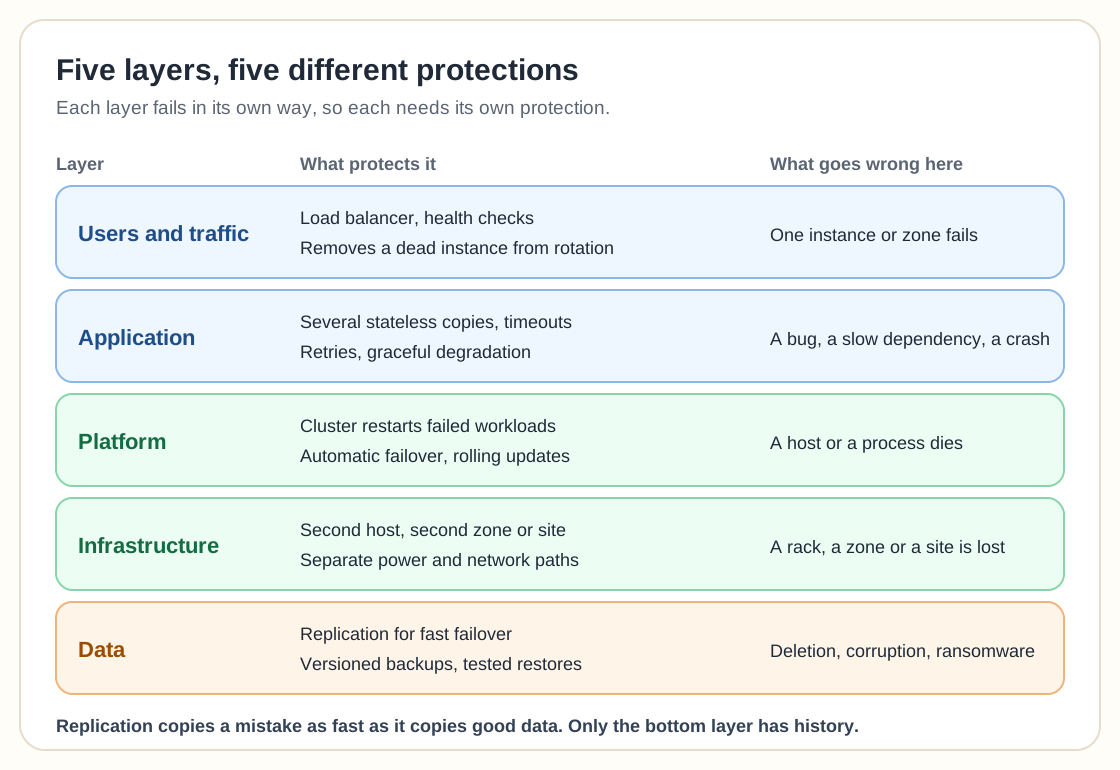
The top layers deal with availability. The bottom layer deals with recoverability, and that is where most teams stop short. Replication keeps a second copy of the data current, which is exactly why it also copies a deleted table, a corrupted file or an encrypted volume within seconds. Only versioned backups give you a point in the past to return to. The article on why scale-out databases still need backup despite replication makes the same point for distributed databases.
The building blocks
Redundancy
Run more than one copy of every critical component, and place the copies so that one event cannot take them all. Two web servers in the same rack share a power feed and a switch. Two servers in different zones or sites do not. Redundancy also covers the dependencies: a second database node, a second DNS provider, a second network path.
Health checks and failover
Redundancy only helps if something notices a failure and acts on it. A health check is a small, regular test, such as an HTTP request to a known endpoint, that tells a load balancer or cluster manager whether an instance can do real work. When the check fails, traffic moves to healthy instances and the platform restarts or replaces the failed one. Make the check test something meaningful. A check that only confirms the process is running will keep sending traffic to an application that cannot reach its database.
Graceful degradation
When a part of the system fails, the rest should keep serving the most important functions. A shop that cannot reach its recommendation service should still let customers pay. Timeouts, retries with limits and circuit breakers stop one slow dependency from dragging down every request that touches it.
Data protection
This block has two parts. Replication gives you fast failover with little or no data loss. Backups give you history, so you can recover from mistakes, corruption and attacks. Follow a rule such as 3-2-1-1-0 and keep at least one copy that an attacker with your admin credentials cannot change. For the difference between a snapshot and a real backup, see snapshots versus backups.
Tested recovery
A recovery plan that nobody has run is a guess. Restore a backup into a clean environment on a schedule, time it and write down what broke. The backup testing guide covers how to set this up.
Monitoring and automation
Monitoring tells you a component is failing. Automation acts on that signal without waiting for a person: restarting a service, shifting traffic, adding capacity. Cloud platforms offer auto-scaling, multi-zone placement and managed failover as building blocks, but you still choose the settings and you still own the data.
RPO and RTO: the two numbers that set the design
Two targets decide how much of the above you need. The recovery point objective (RPO) is how much data you can afford to lose, measured in time. The recovery time objective (RTO) is how long the application can be down before the damage becomes unacceptable. An RPO of 24 hours is met by a nightly backup. An RPO of a few seconds needs continuous replication. The same logic applies to RTO: a restore from backup storage takes hours for a large system, while a warm standby can take over in minutes.
Availability targets are easier to feel when converted to time. An application that must be up 99.9 percent of the year can be down about 8.76 hours in total. At 99.99 percent the allowance is about 52 minutes. Each extra nine usually costs more than the last one, so set the target from the business impact and from habit as little as possible. The articles on RPO versus RTO and on RTO and MTTR together explain how to set the targets and how to check whether you actually meet them.
How to build application resiliency step by step
Step 1: List your applications and rank them by what an hour of downtime costs. Invest in the top few first.
Step 2: Set an RPO and an RTO for each ranked application, and write down who agreed to them.
Step 3: Remove single points of failure: add instances, spread them across hosts and zones, and make the application stateless where you can so any instance can serve any request.
Step 4: Add health checks, load balancing and automatic restart or failover.
Step 5: Protect the data twice: replicate it for fast failover and back it up with versions and an offsite, immutable copy.
Step 6: Add timeouts, retries and degraded modes so that a failed dependency does not stop the whole application.
Step 7: Monitor the signals users care about, such as error rate and response time, and alert on them.
Step 8: Run a recovery test on a schedule, measure the real recovery time, and compare it with the RTO.
For a Kubernetes-focused version of this plan, see how to design a disaster recovery plan for cloud-native applications. If you are choosing a backup product for the data layer, the Enterprise Backup Ledger scores 17 commercial vendors on recovery and cyber resilience.
Common mistakes
Treating replication as backup. A copy that updates every second also copies the mistake.
Putting the backup in the same failure domain as the application, such as the same storage system, the same account or the same site.
Setting an RTO that the team has never measured. Planned numbers and real numbers often differ by hours.
Building redundancy for the application servers and leaving a single database, a single DNS provider or a single identity service.
Health checks that test only whether a process is alive.
Never testing failover or restore until the day it is needed.
Forgetting the people side: no runbook, no clear owner, no access to the backup system when the main directory is down.
FAQ
What is the difference between application resiliency and high availability?
High availability keeps an application answering while a component fails, mostly through redundancy and failover. Resiliency is wider: it includes high availability plus disaster recovery, data protection, graceful degradation and tested recovery.
Is replication the same as backup?
No. Replication keeps a second copy current, so it copies deletions, corruption and ransomware encryption as well. A backup keeps older versions you can return to. Resilient designs use both.
How do I know if my application is resilient enough?
Compare your measured recovery time and data loss in a real test with your RTO and RPO. If the test result misses the target, the design is not resilient enough yet, whatever the architecture diagram shows.
Does moving to the cloud make an application resilient?
Cloud platforms provide building blocks such as multiple zones, auto-scaling and managed failover. You still have to design the application to use them and protect the data with backups you control.
Related guides
More from the backup hub on the same topics.
Need help with backup and recovery?
Use the form below to get in touch about backup strategy, recovery planning, and data protection projects.