Macrium Reflect Alternatives (Free & Perpetual Licence)
Macrium Reflect Free is gone and Reflect X is subscription only. The free and perpetual-licence Windows imaging tools that still work, and their limits.
Overview
This guide covers which tools still image a whole Windows system for free, which sell a perpetual licence instead of a subscription, and the limits to know before you trust a machine to one.
Why people are leaving Macrium Reflect
The search is almost always about licensing. Reflect is still a competent imaging tool. What changed is how you pay for it, and what happens when you stop paying.
The free edition is retired and can't be downloaded, so you can't simply reinstall it on a rebuilt PC
Reflect X is subscription first, and new backups stop when the subscription lapses
Older perpetual Reflect 8 installs still run, but receive no security updates
Some users want a one-time purchase that keeps working on an offline machine
Others want an imaging tool that will still be around in five years without a renewal
If you still run a working perpetual copy of Reflect 8, there is no emergency, because it won't stop working tomorrow. The risk is a rushed migration on the day a disk dies, which is why it makes sense to pick a replacement while nothing is broken.
What a real replacement has to do
A tool that only syncs or copies folders cannot rebuild a machine. Before shortlisting anything, confirm it does all of the following.
Full system image backup, including the EFI system and recovery partitions
Bare-metal restore to a blank or replacement disk
Bootable rescue media, tested before you need it
Incremental or differential backups, so nightly runs finish in minutes
Retention rules that remove old restore points automatically
Restore of a single file without unpacking the whole image
Free tools most often disappoint on the last two. Plenty of them create an image, but far fewer manage the growing pile of images sensibly, and an external drive that silently fills up means the backup has already failed.
Comparison snapshot
| Criteria | Veeam Agent Free | Hasleo Backup Suite Free | AOMEI Backupper Standard | Clonezilla | EaseUS Todo Backup |
|---|---|---|---|---|---|
| Cost model | Free | Free | Free tier with paid upgrade | Free and open source | Perpetual licence available |
| Full system image | Yes | Yes | Yes | Yes | Yes |
| Incremental backups | Yes | Yes | Yes | No, full clone or image only | Yes |
| Bootable rescue media | Yes | Yes | Yes | It is the rescue media | Yes |
| Scheduled unattended runs | Yes | Yes | Yes | No, manual by design | Yes |
| Main limitation | One backup job at a time | Smaller community if you get stuck | Some features reserved for the paid tier | No GUI, offline only, no file-level restore | Paid, and editions differ |
Veeam Agent Free is the closest functional match
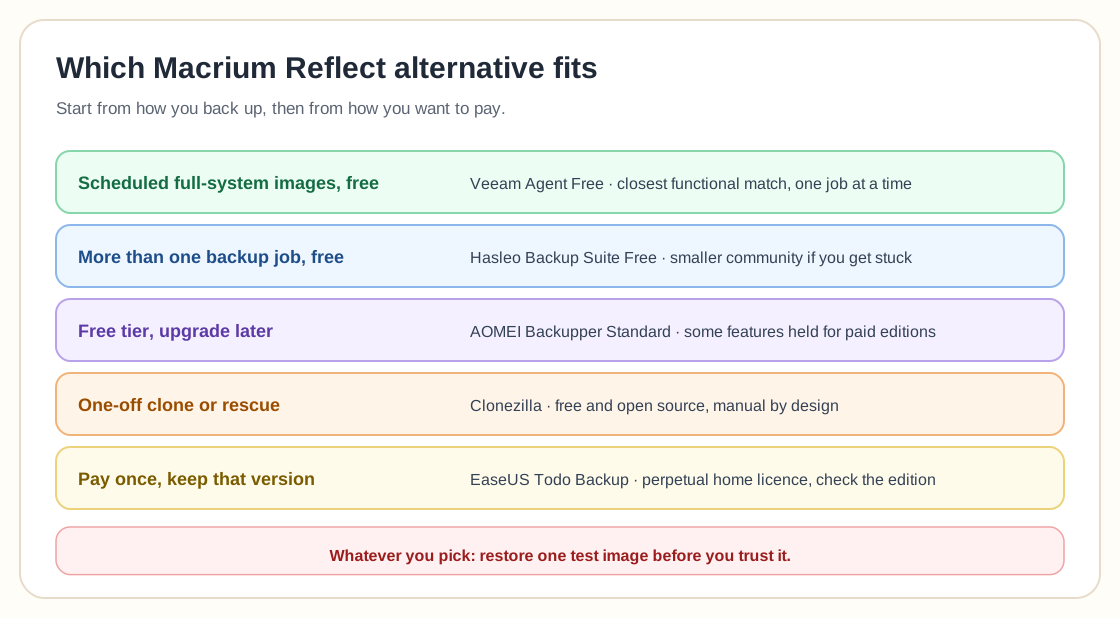
For most people leaving Macrium, Veeam Agent for Microsoft Windows Free is the nearest equivalent. It does image-based backup of the whole machine, incremental scheduling, and bare-metal recovery from bootable media. It also comes from a vendor whose main business is backup, so it isn't a free tool maintained on the side.
The limit to plan around is that the free edition runs a single backup job. If you want one nightly image of the whole system to an external disk, that is exactly one job and the limit never matters. If you wanted separate jobs for the system and for a data volume on its own schedule, it does.
Hasleo Backup Suite Free when one job is not enough
Hasleo Backup Suite Free covers system, disk, partition, and file-level backup with full, incremental and differential modes. It also has scheduling, retention policies, compression, encryption, image verification, mounting, and cloning. On paper it has the most generous free feature set here, and it is the usual answer when Veeam's one-job restriction gets in the way.
The weak spot is the size of its ecosystem. A smaller user base means fewer forum answers when a restore behaves unexpectedly. For a homelab that is rarely a problem. For a machine you cannot afford to be wrong about, rehearse the restore before you rely on it.
Clonezilla is powerful but not for scheduled backups
Clonezilla is free, open source, and very dependable at cloning a disk or partition from a boot environment. It is the right tool for migrating to a new SSD, or for taking a one-off image before a risky upgrade.
It is the wrong tool for a nightly backup. It has no Windows-side scheduler, no incremental chain, and no way to pull a single file out of an image. A guide that recommends Clonezilla as a straight Macrium replacement without mentioning this hasn't thought about what you were using Macrium for.
If you would rather pay once
Most people object to subscriptions and are happy enough to pay. EaseUS Todo Backup still sells a perpetual licence for its home edition, which is what most ex-Macrium users want: buy a version and keep using that version.
Check exactly which edition includes the features you need before buying. Vendors in this category routinely split imaging, universal restore, and cloning across tiers, and the cheapest edition is often not the one that got reviewed.
Test the restore before you trust it
Whichever tool you pick, the migration is only finished once you have restored from a backup, which comes later than the first completed backup.
Create the bootable rescue media and confirm the machine actually boots from it
Check the rescue environment can see your backup drive, including USB or network storage
Restore a single file to prove file-level recovery works
If you have a spare disk, restore a full image to it once
Until you have restored from a backup, you are only assuming it works. Ten minutes of testing now turns that assumption into a recovery plan, and it is the same discipline behind the 3-2-1 backup rule.
Frequently asked questions
Is Macrium Reflect Free still available?
No. Macrium Reflect Free was retired, is no longer offered for download, and received its final security update on 1 January 2024. Existing installations continue to run but are unsupported and unpatched.
What is the best free Macrium Reflect alternative?
Veeam Agent for Microsoft Windows Free is the closest match for most single-machine users, with full system imaging, incremental backups, and bare-metal restore at no cost. Hasleo Backup Suite Free is the better pick if the single-job limit in Veeam's free edition gets in your way.
Is there a Macrium alternative with a one-time payment?
Yes. EaseUS Todo Backup still offers a perpetual licence for home use, which suits people who dislike subscription billing but don't mind paying for software. Confirm which edition carries the features you need, since capabilities are split across tiers.
Can I keep using my old perpetual Macrium Reflect 8 licence?
It will keep working, but it no longer receives security updates. That is fine for a short while and a poor choice for the long term. Choose and test a replacement while your current setup still works, so you aren't doing it in the middle of a recovery.
Does Reflect X still have a free version?
No. Reflect X provides a 30-day trial with full features, after which a paid subscription is required to continue creating new backups. There is no permanently free tier as there was with Reflect 7 and earlier.
Related guides
More from the backup hub on the same topics.
Need help with backup and recovery?
Use the form below to get in touch about backup strategy, recovery planning, and data protection projects.